Showing posts with label Trix And Tweaks. Show all posts

Change a Cmos Battery On Your Own

2 comments

First the safety rules

The inside of a computer is a bad place full of electricity and sharp edges.
On the electricity side always when working on you computer make sure that it’s still plugged in to the power socket and the power is turned off, this is to ensure that any static
From you is discharged through the earth. The inside of most computer cases are unfinished metal and has very sharp edges so be careful.

Block Websites Without Using Software

0 comments


How To Block Websties Without Software, block websites

Steps:

1] Browse C:\WINDOWS\system32\drivers\etc
2] Find the file named "HOSTS"
3] Open it in notepad
4] Under "127.0.0.1 localhost" Add 127.0.0.2 www.sitenameyouwantblocked.com , and that site will no longer be accessable.
5] Done!

-So-

127.0.0.1 localhost
127.0.0.2 www.blockedsite.com

-->www.blockedsite.com is now unaccessable<--


For every site after that you want to add, just add "1" to the last number in the internal ip (127.0.0.2) and then the addy like before.

IE: 127.0.0.3 www.blablabla.com
127.0.0.4 www.blablabla.com
127.0.0.5 www.blablabla.com

etc

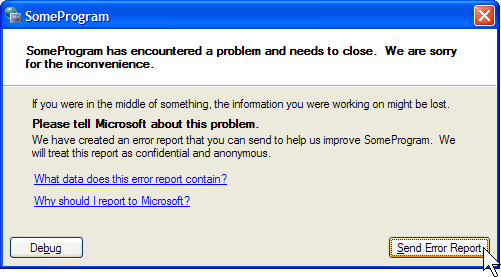
Disable The Send Error Report To Microsoft

1 comments

To disable the stupid feature in WinXP which tries to send a report to microsoft every time a program crashes you will have to do this:

*************************************************************************

Open Control Panel
Click on Preformance and Maintenance.
Click on System.
Then click on the Advanced tab
Click on the error reporting button on the bottom of the windows.
Select Disable error reporting.
Click OK
Click OK

*************************************************************************

Delete Files From The Recent Files Lists

0 comments

This tip requires a change to the Windows Registry. Please see the post "Backup Your Registry" if you are new to the Windows Registry.

Windows Media Player (WMP) is a built-in application that allows you to play multimedia files. Like many other applications, WMP remembers the most recently played files and displays them in the Recent File List under the File menu. This feature is useful if you regularly play certain files, but you may want to clear the list if you share the computer and a user account or create archives and CDs.

There are two ways you can clear the list:

I. The ClearMRU.exe Utility is available for free in the Windows Media Player Bonus Pack from Microsoft, but Microsoft does not support this tool.

II. You can also manually delete the list through the Windows Registry:

1. Start the Windows Registry Editor, regedit.exe, by typing regedit in the Windows Run Command Line.

2. Go to HKEY_CURRENT_USER\Software\Microsoft\MediaPlayer\Player\RecentFileList.

3. Delete the RecentFileList subkey.

4. If you've also streamed content from the Internet, you can delete the RecentURLList subkey.

5. Exit the Registry Editor.

6. Restart the computer.

To keep certain files in the list, don't delete the entire key. Deleting individual entries within the key will get rid of the files that you no longer want in the Recent File List.

2 - Minute IP Address Changer

0 comments

How To: Change Your Ip In Less Then 1 Minute

1. Click on "Start" in the bottom left hand corner of screen
2. Click on "Run"
3. Type in "command" and hit ok

You should now be at an MSDOS prompt screen.

4. Type "ipconfig /release" just like that, and hit "enter"
5. Type "exit" and leave the prompt
6. Right-click on "Network Places" or "My Network Places" on your desktop.
7. Click on "properties"

Enable a Proper Shutdown

0 comments
Auto End Tasks to Enable a Proper Shutdown

This reg file automatically ends tasks and timeouts that prevent programs from shutting down and clears the Paging File on Exit.

Reboot Without Rebooting

0 comments
Have you ever been using your computer and your system sudddenly stops responding in ways like it if you try to open something it just hangs? One time I tried deleting a folder and it said it was in use, but it really wasn't. If this ever happens to you, you can follow these simple steps to 'reboot' your computer without 'rebooting' it.

Press CRTL + ALT + DEL

Goto the 'processes' tab and click explorer.exe once and then click 'end process'.

Now, click File > New Task and type explorer.exe

Everything should be fine now! If the problem is major, I would recomend actually shutting down then starting up again.

How To Get Any Windows Password

0 comments
This works whether its windows 2000 or windows XP or windows XP SP1 or SP2 or windows server 2003....

This works even if syskey encryption is employed...

If it is FAT filesystem...

Just copy the sam file like stated in the first post to an empty floppy disk and take it home. I'll tell u what to do with it later... DON'T DELETE THE ORIGINAL SAM FILE. just remove its attributes. the sam file is a file called SAM with no extension. YOU MUST ALSO GET.... a file called SYSTEM which is in the same folder as SAM. both files have no extensions...
 
Copyright © Computer Tips, Tricks and Tweaks Blogger Theme by BloggerThemes & newwpthemes Sponsored by Internet Entrepreneur